
Prompt:
Create a complete command-line application using Python.
The application should solve this problem:
[Clearly describe the problem in 1–2 sentences.]
Core features:
[Feature 1 with exact behavior]
[Feature 2 with exact behavior]
[Feature 3 with exact behavior]
Technical requirements:
Use a clean and modular structure with functions or classes
Use argparse (or click if specified) for CLI input handling
Store data using [JSON / SQLite / file system]
Handle edge cases and invalid inputs properly
Output requirements:
Provide full working code in a single file (or structured files if needed)
Include setup and run instructions
Show example commands and expected output
Keep the code production-ready, not a prototype
Constraints:
Do not use unnecessary external libraries
Prioritize readability and maintainability
Python CLI Prompt for ChatGPT (Build Apps Fast)
Prompt
114 words
If you want to build a command-line tool quickly, using the right Python CLI prompt in ChatGPT is the fastest way to get production-ready code. A CLI app is one of the fastest ways to build something practical with Python. No UI overhead. No design distractions. Just logic, structure, and execution.
But here’s where most people fail.
The flaw is vague prompting.
They ask ChatGPT to “create a CLI tool” and expect clean, usable code. That won’t happen. The model fills gaps with assumptions, and assumptions lead to inconsistent output.
If you want reliable results, your prompt needs to do three things: define the problem, constrain the build, and control the output.
Here’s a high-performance prompt you can reuse for any CLI project.
The Solution: The Perfect Python CLI Prompt
Prompt:
Create a complete command-line application using Python.
The application should solve this problem:
[Clearly describe the problem in 1–2 sentences.]Core features:
- [Feature 1 with exact behavior]
- [Feature 2 with exact behavior]
- [Feature 3 with exact behavior]
Technical requirements:
- Use a clean and modular structure with functions or classes
- Use argparse (or click if specified) for CLI input handling
- Store data using [JSON / SQLite / file system]
- Handle edge cases and invalid inputs properly
Output requirements:
- Provide full working code in a single file (or structured files if needed)
- Include setup and run instructions
- Show example commands and expected output
- Keep the code production-ready, not a prototype
Constraints:
- Do not use unnecessary external libraries
- Prioritize readability and maintainability
This works because it removes ambiguity. You’re telling ChatGPT exactly how to think.
Instead of generating random scripts, it now operates within a defined system. That’s the shift from experimentation to reliability.
You can swap the problem statement and instantly generate different apps:
- Personal expense tracker
- File organizer
- Note-taking CLI
- Log analyzer
Same prompt. Different outcome.
If you’re serious about using AI for development, stop chasing clever prompts. Start using structured ones. That’s where consistency comes from.
Example: Expense Tracker CLI
Here’s how this prompt looks when applied to a real use case.
Prompt Input:
Create a complete command-line application using Python.
The application should solve this problem:
Track daily expenses from the terminal and allow users to review spending over time.Core features:
- Add a new expense with amount, category, and date
- View all expenses with optional filters (date or category)
- Show total spending summary
- Delete an expense by ID
Technical requirements:
- Use a modular structure with functions
- Use argparse for CLI input handling
- Store data in a local JSON file
- Handle invalid inputs and missing data gracefully
Output requirements:
- Provide full working code
- Include setup and run instructions
- Show example commands and expected output
Constraints:
- No external libraries
- Keep code clean and readable
What You’ll Get:
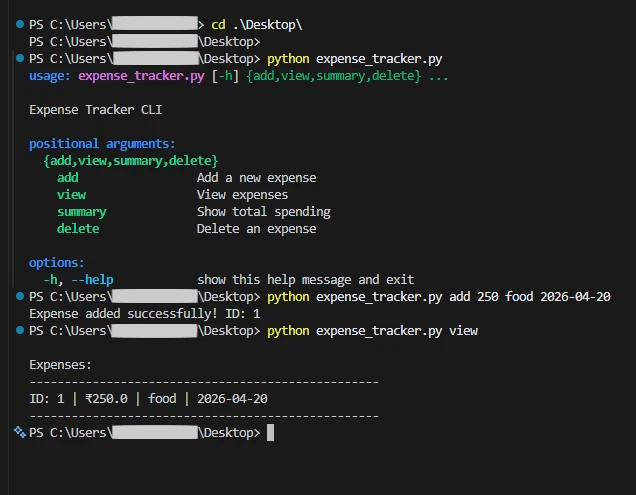
Once ChatGPT generates the code, simply copy it and save it to your machine as a new Python file (e.g., expense_tracker.py). Open your terminal, navigate to the folder where you saved it, and run the app using:
python expense_tracker.py --help
(This will instantly show you all the commands ChatGPT built for you to add, view, and delete your expenses!)
Instead of a messy script, ChatGPT will generate:
- A structured Python CLI app
- Clear command handling (add, view, delete)
- Persistent storage using JSON
- Ready-to-run instructions
This is the shift.
You’re no longer asking for code. You’re defining a system that produces usable tools.
Want to organize your development time better? Check out our Time Blocking Prompt for ChatGPT.
Pro Tip:
If the output still feels messy, tighten the constraints. Add rules like “use OOP” or “separate logic into modules.” Better prompts don’t ask for more. They remove freedom.
The Bottom Line
Bad Python scripts from ChatGPT usually aren’t a coding problem. They’re a scoping problem. When you give the AI unlimited freedom, it overcomplicates things.
Give it clear requirements, strict constraints, and a defined problem, and it becomes predictable.
Copy the prompt, plug in your CLI idea, and build something that actually works.
Frequently Asked Questions
When you use a generic prompt, ChatGPT has to guess your technical skill level, your preferred file structure, and how you want to handle inputs. This leads to "scope creep," where the AI includes unnecessary libraries or builds a messy architecture. Defining constraints upfront prevents this.
Don't start a new chat. Copy the exact error message from your terminal and paste it back into the same ChatGPT thread. Because you used a structured prompt initially, the AI understands the context and constraints of your app and can usually fix the bug in one iteration.
This prompt is highly optimized for single-purpose CLI tools. If you are building a complex, multi-file application (like a web scraper with a database and API integrations), you should break the project down. Ask ChatGPT to outline the architecture first, then use variations of this prompt to generate each specific module.